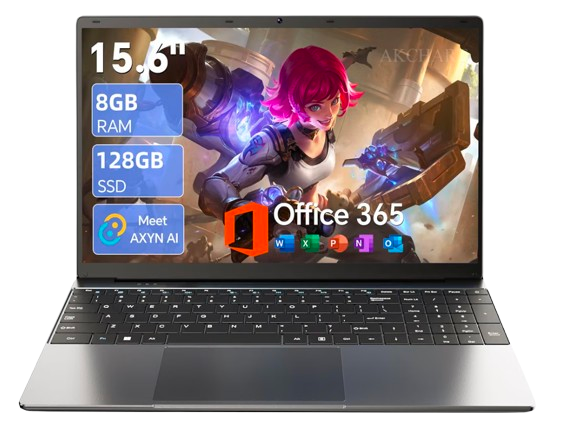
15.6” AI Laptop With Office 365
### 15.6-Inch AI Laptop with Office 365: Complete Guide
What Is a 15.6-Inch AI Laptop with Office 365?
A 15.6-inch AI laptop with Office 365 is a versatile computing device designed for work, study, entertainment, and everyday productivity. It features a large display for comfortable viewing and may include AI-powered tools that help users complete tasks more efficiently. Office 365, now called Microsoft 365, provides access to productivity applications and services, depending on the included subscription or license.
How It Works
The laptop runs an operating system that allows users to install software, browse the internet, manage files, and perform everyday tasks. AI features may assist with writing, summarizing, searching, or other activities, depending on the hardware and software. Microsoft 365 applications support document creation, spreadsheets, presentations, and communication.
Main Benefits
The 15.6-inch screen provides a comfortable workspace for multitasking, online learning, and watching videos. AI tools can simplify selected tasks, while Office applications help users manage schoolwork, business documents, and personal projects efficiently.
Key Features to Consider
Look for a suitable processor, sufficient RAM, SSD storage, display resolution, webcam quality, and available ports. Check whether the laptop includes a dedicated AI processor or relies on software-based AI features. Also verify whether Microsoft 365 is permanently licensed, offered as a trial, or requires a subscription.
Where You Can Use It
This laptop can be used at home, in offices, at schools, or while traveling. It is suitable for online classes, video meetings, writing reports, preparing presentations, browsing websites, and enjoying digital entertainment.
Battery and Charging
Battery life depends on battery capacity, screen brightness, workload, and processor efficiency. AI applications and demanding software may consume additional power. Check the manufacturer’s battery-life estimates and charging specifications before purchasing.
Ease of Use
The large screen and familiar keyboard make everyday computing convenient. Windows-based models generally support common productivity applications, while Microsoft 365 offers familiar tools such as Word, Excel, and PowerPoint. Setup requirements depend on the operating system and included software license.
Maintenance Tips
Keep the operating system and applications updated, clean the screen with a suitable microfiber cloth, and protect the laptop from dust, moisture, and excessive heat. Avoid blocking ventilation openings, use a compatible charger, and back up important files regularly.
Pros and Cons
The main advantages include a spacious display, versatile productivity features, potential AI assistance, and access to popular office applications. Possible disadvantages include limited battery life under heavy workloads, additional subscription costs, and varying AI capabilities between models. Performance ultimately depends on the laptop’s actual specifications.
Who Should Buy It
This laptop may suit students, office workers, freelancers, small-business owners, and home users who need a device for everyday computing and productivity. Buyers who plan to use advanced AI software should check the processor, memory, and software requirements carefully.
Final Thoughts
A 15.6-inch AI laptop with Office 365 can be a practical choice for combining everyday computing with office productivity and selected AI features. Before buying, compare the processor, RAM, storage, battery life, display quality, and included Microsoft 365 license to ensure the laptop meets your needs and budget.



Reviews
There are no reviews yet.